So you want to learn CSS? Great decision; CSS is the language for web and graphic designers to learn. Short for Cascading Style Sheet, CSS is the language used to add style to HTML elements. If you are unfamiliar with HTML you will have little use for CSS, so I recommend you begin reading my HTML Lessons.
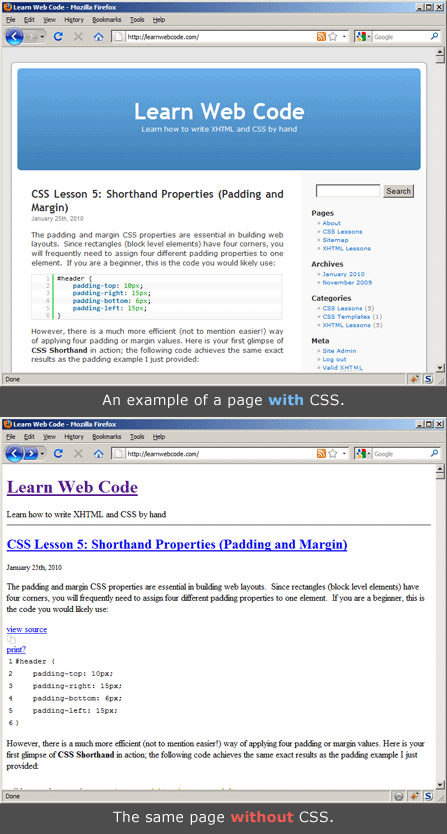
A World Without Style
Imagine you have a web page written in HTML with your main heading inside a <h1> element and a few paragraphs in <p> elements. Without any CSS, most web browsers will render your page in a plain black text, with your <h1> in a large, bold font. Your paragraphs will fill the entire width of the browser, resulting in impossible-to-read line lengths (the human eye prefers only around 12 words per line). To put it bluntly; your pages will look horrible.
CSS To The Rescue
We need CSS to add our own custom styles; we need CSS to add color, size, columns, and layout; we need CSS to beautify our typography; we need CSS to add background textures and images. If good HTML is the key to an organized, accessible web, then CSS is the key to a beautiful web. CSS puts the design in Web Design.
How It Works
Cascading Style Sheets are simple text files saved in a “.css” extension which contain style Rules. For example, let’s imagine we had a <h1> heading element on a page, and we wanted to make it orange, and center aligned. Here is the code we would add to our .css file:
h1 {
    color: orange;
    text-align: center;
}
Let’s Dissect The Code
Relax, I don’t expect you to understand this code yet! Although you have zero training to understand the syntax of the code, if you speak English odds are you can make a little sense of it. The following graphic explains the syntax of the code:
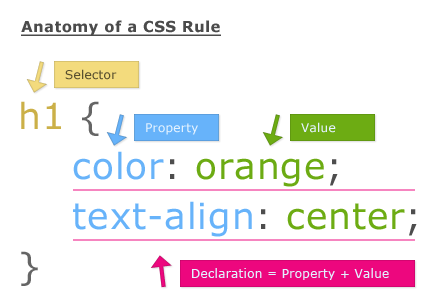
Our CSS Rule begins with “h1” which is our CSS selector. The selector tells the web browser which HTML element we wish to style.
Next, the word “color” is a property and “orange” is its value. A property and value pair together and create a declaration. We create complex style rules by stringing together multiple declarations, which are separated by semicolons. This entire piece of code, including the selector and declarations, is known as a CSS Rule.
Finally, directly preceding, and directly following the declarations we enclose our Rule in curly brackets (found on your keyboard by holding shift and pressing the buttons directly to the right of your P key).
That’s it for today’s lesson. You’ve learned a great deal of new material, so let’s recap.
- CSS styles the HTML elements of a web page
- Cascading Style Sheets are simple text files
- Style sheets are made up of Rules
- Rules are made up of selectors and declarations.
- Declarations are made up of properties and values.
In our next lesson we will learn how to write and save our first CSS file, and more importantly, how to link it to an HTML page.
If you prefer to watch video lessons instead of reading written lessons check out my 8 hour video course and learn pro-level HTML, CSS, and responsive design.


Thank you so much for your assistance in learning code. I’ m a complete newbie and I’ve had some difficulty wrapping my brain around the different CSS rules. You broke it down into a manner that I could understand a bit easier. I’m still struggling a little, but you’ve certainly helped me along.
Thanks again,
Michael
Seriously thanks very much. I have followed all your lessons right from HTML to CSS and I just feel inspired.
Thanks
Right now I am feeling so happy because all the confusion is now cleared.
Your tutorials just made it so easy for me. I promise to be a great web designer!
Thanks Brad
Moving to lesson 2
Kind Regards,
Daniel.
Thank you, your such an amazing guy at teaching css, i believe by the end am going to be better